
Looking for the latest release notes?
This version of the VBOX Test Suite Software includes some significant updates, new test plugins and bug fixes.
Changes are often made due to customer feedback requesting new features or to fix bugs and other issues found during testing.
We strongly recommend users always update to the latest software release to take advantage of new features and to benefit from improved stability.
For installation guidance, refer to the VBOX Test Suite User Guide.
If Automatically check for updates is enabled, the software will detect available updates when connected to the internet and prompt you to download them.
Microsoft Windows 7 SP1 or newer (must be compatible with .Net Framework 4.7.1)

- UNR79 CSF (beta)
The test allows the user to complete and analyse a Commanded Steering Function test as described in the UNR79 document. - UNR79 Lane Keeping (beta)
The test allows the user to complete and analyse a Lane Keeping Function test as described in the UNR79 document. - UNR79 Max Lateral Accel (beta)
The test allows the user to complete and analyse a Maximum Lateral Acceleration test as described in the UNR79 document.

- EPA (beta)
The test allows the user to carry out a pass-by noise test in accordance with the EPA regulation.
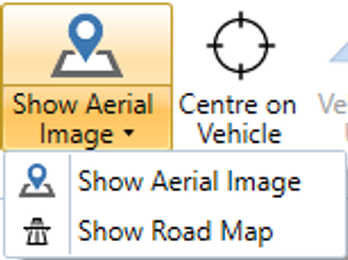
The Map window can now display an aerial image or a road map.
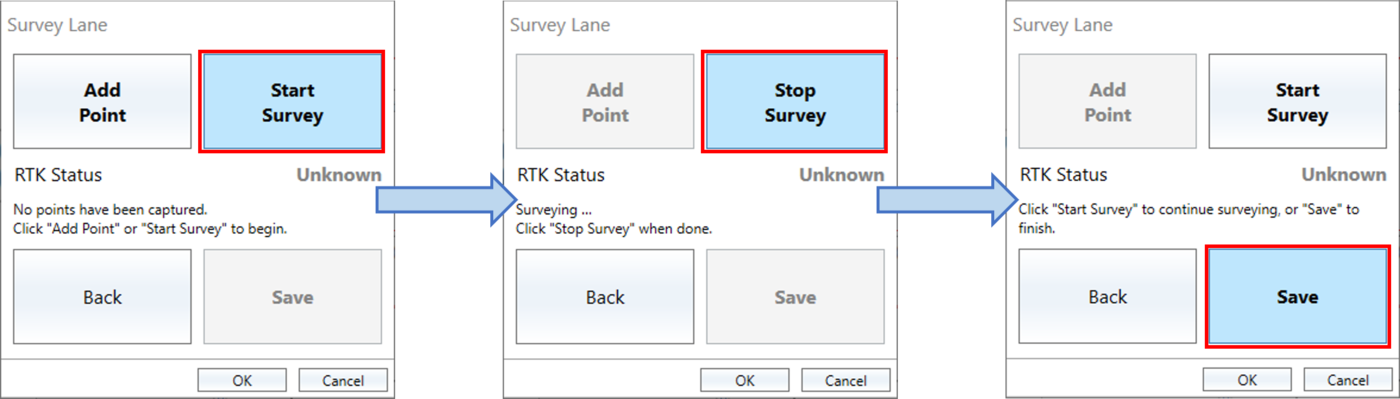
Lanes used in the Park Assist and new UNR79 test plugins can now be surveyed live in the software.
A new Screen Capture video facility has been created, that records whatever is being displayed on the screen as an .mp4 video file.

- Support for VB3i Voice Tagging within the Chart window.
- Column titles can now be renamed.
- New languages available:
- Italian
- Korean
- Portuguese / Brazilian
- Russian
- Spanish
- Secondary channels can now be added to a live chart gauge.
- A live chart gauge can now be auto-scaled.
- The map vehicle overlay information can now be exported/imported.
- Test Gates information is now also available within the Chart and Map windows.
- A Gate can now be used as a start condition within the Accel test.
- VBOX Test Suite now uses GPU acceleration for video playback (particularly useful for lower-powered machines when viewing multiple videos).
- When creating a report from a Brake test, selected runs will now be included from multiple sessions, not just the currently selected session.
- Gates can now be exported/imported as a .spl file within test plugins, which use just 1 gate.
- The R78 Motorcycle Brake Force test can now use multiple 'Or' start conditions.
- Zero Brake Force Channel option added to the R78 Motorcycle Brake Force test, which will automatically ‘Zero’ the brake force sensor.
- All test results columns are now available as a gauge within the dashboard.
- When a new gate is added, the gate is now shown as dark blue instead of light blue.
- When connecting a VBOX Sport to VBOX Test Suite, the software will now notify the user if the Bluetooth connection is lost. It will also ask if you would like to reconnect with the unit.
- A Speed Quality gauge is now available for use within the SAE J2263, WLTP GTR15 and ABNT 10312 Coastdown tests to provide the status of the last completed run with regard to the Speed Quality criteria.
- A new Screen Capture video facility has been created, which records whatever is being displayed on the screen as an .mp4 video file.
- Improved map performance for long-running tests.
- Graph scaling improvements for large files.
- Lap timing availability improved.
- Handling of VB3i cycles.
- The timestamp of saved data has improved.
- Files from Video VBOX Pro fixed (log rate error).
- 'Vehicle up' map feature improved.
- Bluetooth connections improved.
- Latency issues improved on lower-powered machines.
- Adding gates 'Online' improved.