
This is a general overview of VBOX Setup software, connected to VBOX Omega, and its functionality. You can use VBOX Setup Software to configure VBOX Omega. It provides greater functionality in comparison to using the Front Panel.
To configure VBOX Omega, the unit needs to be connected to a power source and a computer.
Configuration is performed using VBOX Setup Software, which can be downloaded here. Using the supplied loom, connect an RLCAB001 cable to the SERIAL lead and connect the serial plug to the computer's serial port – this can be done via a serial > USB converter if required.
IMPORTANT
Microsoft Windows 7 SP1 or newer is required (must be compatible with .Net Framework 4.7.1)
Once physically connected and powered, open the software and use the drop-down list to select the correct COM port that your VBOX Omega unit is connected to. VBOX Setup automatically connects to the selected device and enters the setup screen for your unit.
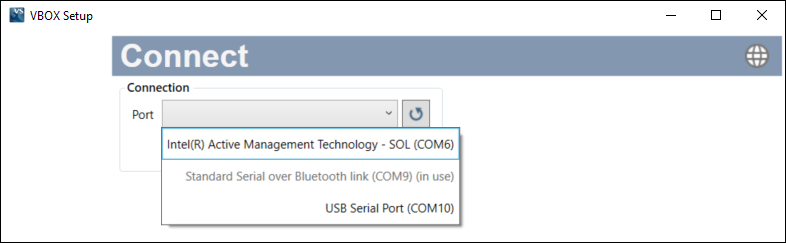
Note: An auto-detect message may appear if the baud rate has been changed from the default value - select ‘Yes’ to allow the different baud rates to be scanned.
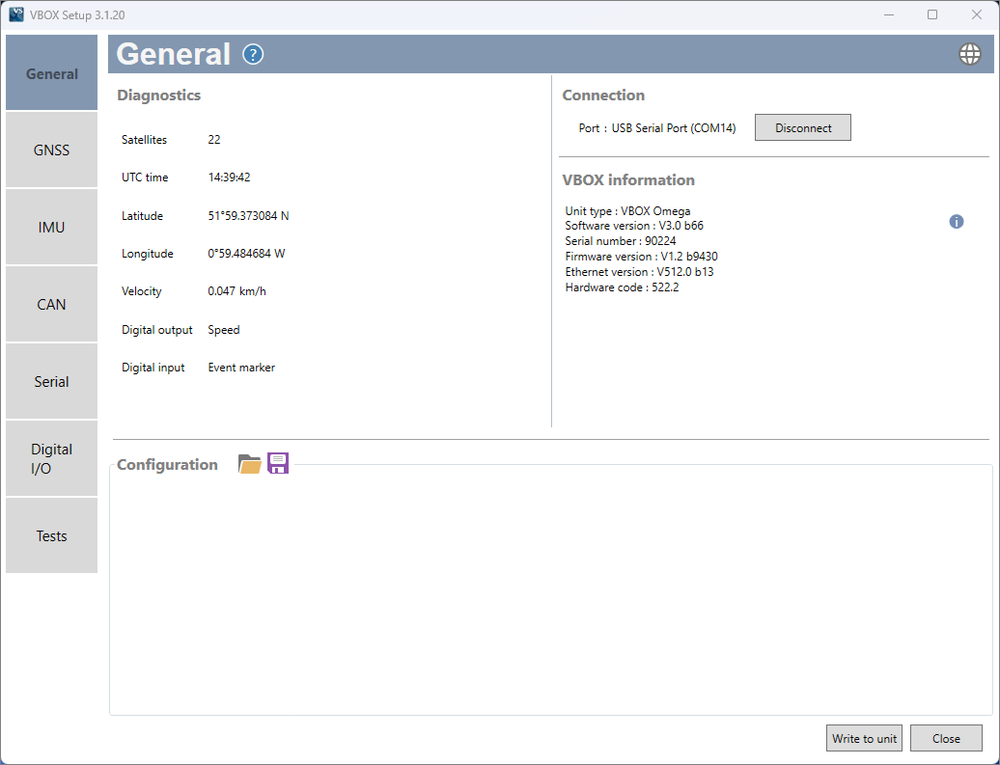
The menu buttons in the sidebar allows you to navigate between the different settings menus. Click the buttons to select the desired menu.
Clicking on the question mark icon when you have an active internet connection will open the corresponding user guide page for the menu within the Racelogic Support Centre.
The header displays the name of the menu that you have currently selected.
These options allow you to save the selected settings as a .rsf file, or to load a previously saved setup from a .rsf file.
Recent configurations will appear in this section of the screen.
By clicking the globe icon, you can select the language that VBOX Setup uses.
This area contains all the settings options for the selected menu.
After making changes to your setup, the Write to Unit button should be selected to ensure the settings have been uploaded to the connected VBOX Omega.
Clicking this button closes the software. You will be prompted to save the settings if the changes have not been written to the VBOX Omega unit.
The sidebar enables you to switch between the different settings menus; General, GNSS, IMU, CAN, Serial, Digital I/O and Tests.