
You may find that you need to connect a Racelogic IMU and the Brake Pedal Force Sensor to the 25-pin Analogue Input connector on your VBOX 3i unit at the same time. This is usually when you want to perform tests where both Kalman Filter integration and pedal force values are required.
This article explains how to wire the Brake Pedal Force Sensor into the RLCAB119 IMU Integration cable.
- IMU Integration cable (RLCAB119)
- LEMO 4W Plug to 4 wire unterminated cable (RLCAB148 – provided with the Brake Pedal Force Sensor)
- Small flat-headed screwdriver
Open the 25-pin terminal connector block on the RLCAB119, and loosen the screws on the strain relief bar that holds the IMU cable in place.
You can find details for the standard wiring in the cable on the cable drawing available here.
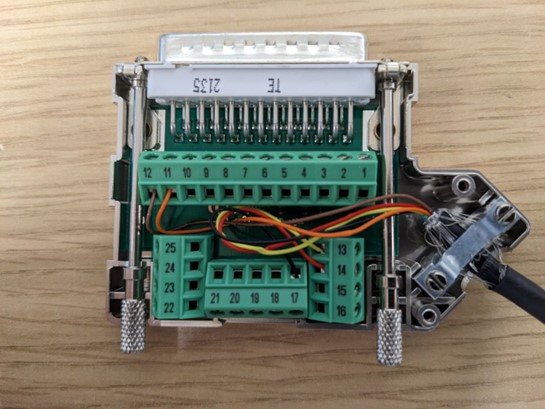
Insert the unterminated end of the Brake Pedal Force Sensor cable (RLCAB148) through the strain relief bar and tighten the screws to hold it in place.
Connect and fix the 4 wires from the RLCAB148 to the following terminals:
Blue wire
Ground: Terminal 15
Yellow wire
Power Supply: Terminal 14
Red wire
Analogue Output – Positive: Terminal 1
Green wire
Analogue Output – Negative: Terminal 2
NOTE
In the RLCAB119 terminal connector block, terminal 14 will already have the IMU cable connected. You can, however, insert the wire from the RLCAB148 into the pin with the other IMU wire. Take care not to dislodge the IMU wire during the install.
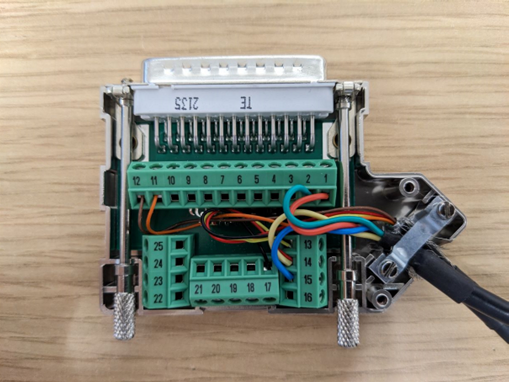
Attach the top side of the connector block housing and fix it in place with the 2 screws. Take care not to pinch or crush any of the wires.
Configure and connect your IMU and Brake Pedal Force Sensor as you normally would.