
In the Serial menu in VBOX Setup, connected to a VBOX 3iS unit, you can configure the format, content and data rate of the serial stream transmitted by the VBOX unit.
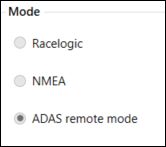
Racelogic
For serial communication with other Racelogic products (not available if ADAS Mode is enabled).
NMEA
For user defined NMEA message output (not available if ADAS Mode is enabled).
ADAS remote mode
This mode is automatically selected if ADAS mode is enabled.
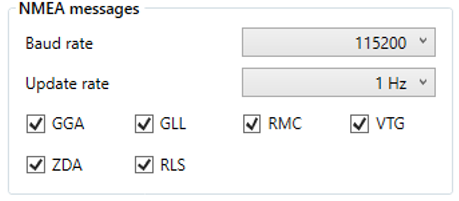
If the NMEA message format is selected, the following options become available:
Baud Rate
The required serial baud rate can be selected from this drop down list, selectable from 4800 - 115200 kbit/s (115200 kbit/s by default).
Update Rate
The update rate of the NMEA messages can be changed using this drop down list, selectable from 1 - 100 Hz (1 Hz by default).
Message selection
NMEA messages can be selected and deselected for transmission by checking the boxes next to each message type.
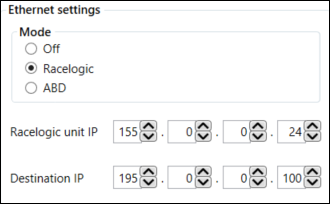
Off
Ethernet is switched off.
Racelogic
This mode will change the baud rate to 1 Mbit/s and default all CAN IDs 301 to 603 including ADAS if they are enabled (does not include Stahle output).
ABD
This is the default mode.
This mode will output the following IDs:
- 307
- 308
- 309
- 314
- 324
- 32B
- 600
- 601
- 602
- 603
Note: Messages will only be transmitted if all ABD CAN channels are enabled. Certain ABD modes, e.g. ABD pedestrian, do not enable all ABD CAN channels. Therefore, the unit may not output any data when these modes are configured, even though ABD Ethernet is enabled.
This is the IP address of your VBOX 3iS unit. In this setting, you can change the IP address, which is stored in the unit's memory.
This IP address will be automatically set when you select ABD mode.
A static IP that you can change and that is stored in the unit's memory.
This IP address will be automatically set to ABD's default controller IP when you select ABD mode.