
Looking for the latest release notes?
This version of the VBOX Test Suite Software includes significant updates, a new test plugin and bug fixes.
Many of the changes have been made as a direct result of customer feedback requesting new features. Some changes have been made to fix bugs and other issues found during testing.
Racelogic strongly recommend that all users update to the latest software release to take advantage of the new features and benefit from the improved stability.
For installation guidance, refer to the VBOX Test Suite User Guide.
If Automatically check for updates is enabled, the software will detect available updates when connected to the internet and prompt you to download them.
Microsoft Windows 7 SP1 or newer (must be compatible with .Net Framework 4.7.1)

R139 Brake Assist, Category B (beta)
The test allows the user to carry out a brake assist test in accordance with the R139 regulation.
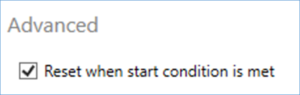
New ‘Reset on start condition’ option within a Brake 'Trigger' test. This allows the test reset condition to be disabled, so the test will always start on the first trigger.
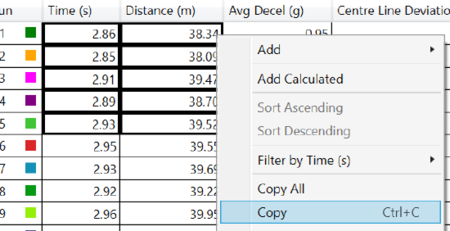
It is now possible to left-click and drag to select or hold control to multi-select Test Result cells. This allows data to be copied more easily.
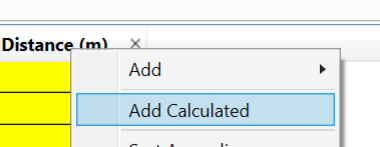
New 'Calculated Column' feature in Results to allow calculations based on test results.
Calculations can be based on other result columns or start/end/average/min/max/std.dev value of a channel during the run.
- Run Graph now displays an interpolated point for the start and the end of the run for a given channel. This helps to make it clear when viewing the graph what the start of run and end of run values were for that channel.
- Measure Tool now interpolates the start and end of the range. Previously, the measure tool provided measurements from the first sample to the last sample within the range only.
- End of Session condition is now available in the Custom Test plugin. This allows a test to be configured, for example, to start immediately and then stop at the end of the file.
- Session Colour is now displayed within the File List ribbon drop-down menu on the Home tab.
- Gauge Test channel selection organised by source of channel data—i.e. test column gauges, count down gauges, default gauges and test plugin-specific gauges.
- UNR79 Lane Keep - distance to lane computations now work when just one lane is loaded.
- New Release Notes section within the File Menu detailing information such as new plugins, new features and bug fixes in relation to the current Software version. Release notes can also be accessed next to the software version within the About Menu.
- It is now possible to Expand and Collapse Conditions within Test Settings.
- Dashboard no longer rearranges gauges automatically. Instead, the user has the option to zoom in and out depending on available space using the mouse wheel or zoom buttons on the ribbon.
- Other Dashboard improvements to include grid now being hidden and alignment increments being reduced, angular meter avoids wasted margins—and so renders much better when sized small, and a new 'Dashboard Update Rate' is available in options.
- Custom Test now allows a test to be started when a channel value >= a given value. Previously, a test could only be started when a specified value was crossed.
- Lap Timing plugin (beta) - perform lap analysis for driving around a circuit. Also allows remote data connection for live analysis in conjunction with SimPack.
- Improved support for VBOX Touch data files.
- R51 Pass By Noise wide open throttle result column between PP' line and BB' Line.
- R51 Pass By Noise ability to set engine location.
- Chart now defaults to show the whole session - even when more than one run is selected. To compare runs, click on the chart, then choose the 'Run Compare' option in the ribbon.
- New 'Clear All' button to remove all open files/sessions.
- Brake Test 'Reset on Start Condition' advanced test configuration option added.
- Ability to 'playback' a .vbo file. Previously, this was only possible if the file had an associated video.
- VBOX Setup is now installed automatically on new installs of VBOX Test Suite.
- VBOX Drivers are now installed on new installations without a separate install prompt.
- It is now possible to install VBOX Test Suite silently via a batch script.
- Speed Sensor connection issue fixed.
- UI delay after completing an online run in more than one session is fixed.
- Addressed an error when moving dashboard gauges with Unicode character labels.
- Addressed an issue within the GTR15 Coastdown plugin of incorrect time in the result where the time crossed UTC midnight.
- Error Message - "Could not load file or assembly 'System.Net.Http" fixed.
- The Results 'Filter' feature now appears correctly.
- Fixed an issue where the application crashed when cutting 'Before Cursor'.
- Legend order is now consistent between charts.
- Fixed an issue preventing moving average and cycle TxPH calculation in the TxPH plug-in when the file starts close to UTC midnight.
- Fixed an exception message issue when copying a column with the result ticked.
- Addressed the issue where KML export was including 0,0 positions from dropouts in averaging to give positions halfway between the two. Now, dropouts are ignored.
- Improved handling of data when UTC crosses midnight.
- Brake Test 'Time since last run' fixed to exclude accidental test starts.
- Fixed zoom issue when 'Centre on vehicle' is enabled on the map.
- Improved map handling when sats are 0 but position is present.
- Fixed a Coastdown J2263 bug with run heading that crosses 0°.
- The associated audio file's continued playback issue has been resolved.
- TxPH Moving avg and cycle value not calculated in specific situations/files fixed.
- Addressed an issue where .vbo export is losing lat/long precision.
- VB3iS vertical velocity fix.
- Fixed an issue where copying a chart as an image causes the user-added chart to disappear.
- Fixed an issue where channel names were not shown on all charts for a screenshot.
- Fixed an issue with map jumping as the user attempts to pan (caused by a small mouse drag at the same time).
- Fixed an issue with map scale numbers seeming to jump around when zooming in and out.
- Fixed an error after deleting a gate.
- Fixed an issue with displaying all points on the live chart - depends on the Dashboard Rate being set in options.