
Looking for the latest release notes?
This version of the VBOX Test Suite Software includes significant updates, a new test plugin and bug fixes.
Many of the changes have been made as a direct result of customer feedback requesting new features. Some changes have been made to fix bugs and other issues found during testing.
Racelogic strongly recommend that all users update to the latest software release to take advantage of the new features and benefit from the improved stability.
For installation guidance, refer to the VBOX Test Suite User Guide.
If Automatically check for updates is enabled, the software will detect available updates when connected to the internet and prompt you to download them.
Microsoft Windows 7 SP1 or newer (must be compatible with .Net Framework 4.7.1).
Do not use beta versions when performing critical tests unless a problem with a release version prevents you from completing the required tests satisfactorily.
IMPORTANT
This software version is considered pre-release.
It has been tested to ensure any new functionality or bug fix has been implemented correctly, but has not yet completed a full testing cycle and sign-off—there may still be other bugs.
Bug Fixes
- Fixed incorrect interim results when crossing UTC time midnight for Custom Tests.
- Fixed positional jump when loading a .vbc line file of 3 points.
- Addressed issues accessing the Online mode on the Windows 7 operating system.
Key New Features
Frequency Distribution Analysis
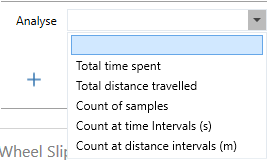
Test results can now be further analysed to see distance or time spent within a channel value range, or how often the channel was within a value range.
Additional New Features
- Support added for online connection to VBOX Sigma - our new low-cost RTK data logger.
- Support added for VBOX Touch online connection.
- Wheel Slip channels added to Custom Test.
- The recent files list now shows the full file path as a tooltip.
- 'Time since last run' can now include or ignore aborted runs.
- Report columns for Test Time, Distance, Start Speed, End Speed & Average accel use decimal places as configured in Options.
- R41 test is now usable with a larger range of PMR values.
- UNR79 tests now have smoothing on Lateral Acceleration due to a regulation change.
- Interim results now available on UNR79 tests.
- R117 Pass-By Noise tests can now be run in a single direction. More information on this can be found here.
- Elapsed distance accuracy improved by counting the start of movement from 0.5 km/h rather than 0.8 km/h.
Bug Fixes
- 1ft rollout accuracy improvement.
- Fixed an issue where Map Gates and Scale flickered when online.
- Fixed an issue where zoom and cursor position are lost after changing the smoothing when in Workspace.
- Fixed an issue where the software crashed when loading in a VBO file exported from a VBTS session when the session had been 'paused'.
- Fixed an issue where certain MFDD values could cause the VBOX Test Suite application to freeze.
- Exception given if no heading data is present during the brake test.
- When exporting test results, the 'Time/Distance since last run' column values are always zero.
- Exception when setting the gate too close to the point of 'end of movement'.
- UNR79 lane cross not reported correctly when no vehicle shape/overlay is defined.
- After renaming a session (by clicking on the tab in test results), that session name is not being reflected in reports.
- R117 Pass-By Noise - changing the tyre class wasn't automatically updating results.
- Maths channels that were copied & pasted did not retain formatting.
- 'Saving VBO file session, Please try again after a few seconds' prevents the software from being closed.
- With 'refresh channel names' unticked, VBTS could freeze when connecting to the unit.
- VBOX Test Suite is now more tolerant of missing or corrupted data.
- Fixed an issue where the Reset on Start Condition advanced test configuration feature was not working correctly in some situations.