
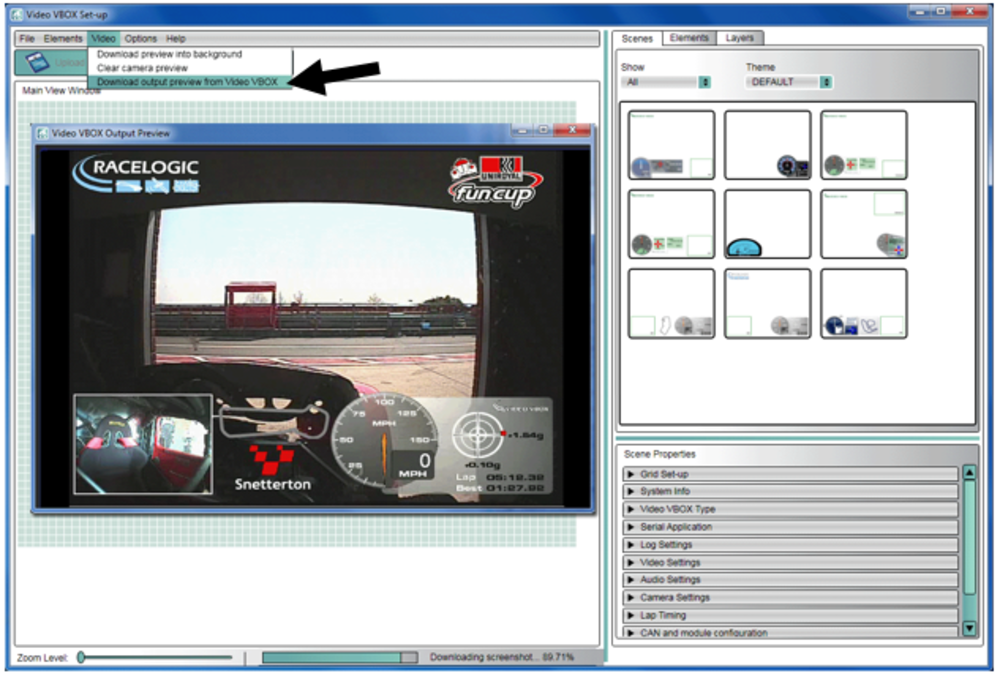
By connecting the Video VBOX to your PC via the USB cable, you can preview the video output to allow you to check and align your cameras to make sure they are straight. To do this, select Video → Download output preview from Video VBOX.
This will cause a floating window to appear with a video snapshot. You must have installed the software USB drivers in order for this function to operate.
Note that the preview updates every few seconds, it is not live video.
You can load this image into the background of the scene to check the best placement of the gauges, this is done using Video → Download preview into background.
NOTE
If an error message appears 'unable to detect unit' when a powered unit is connected to your PC, you may not have opted to install the VVB drivers when the software was installed. Try downloading and running the Racelogic Drivers and restarting your PC.