
The VBOX Pit Lane Timer has 2 different display modes, which you can navigate between with the up and down buttons on your unit.
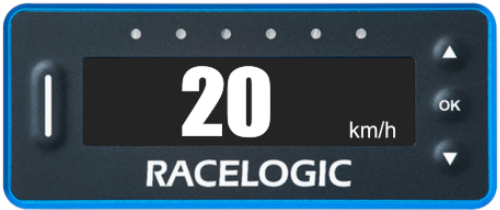
The Speed Display Mode simply shows a live speed value.
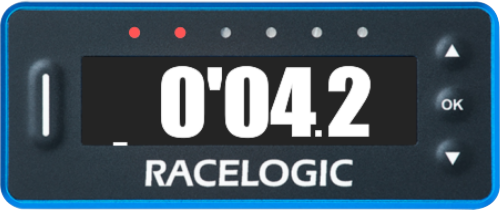
The Pit Lane Timing Mode will prompt you when it is time to leave the pit box and warn you if you are likely to cross the pit line too early or too late.
NOTE
The data used in both display modes are calculated by the unit at all times, even if you choose not to display it.
Pit Lane Timing Configuration
Before you can use this display mode, you must configure the following settings in the main menu.
- Pit Timing Mode - select timing method.
- Pit Lane Entry and Exit Point - define the pit gates.
- Minimum Pit Time - set the pit time limit for the event.
- Pit to Exit Time - set the estimated time from pit box to exit gate.
- Pit Lane Speed Limit - set the maximum pit lane speed.
Operation
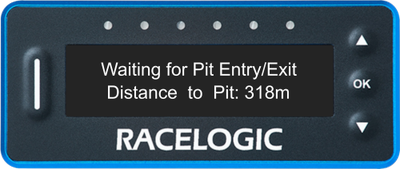
After you have configured the settings above, the Pit Lane Timing display will now show the live distance to the pit lane entrance point.
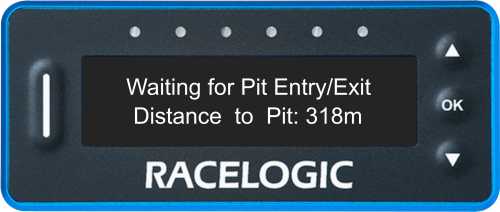
After you have configured the settings above, the Pit Lane Timing display will now show the live distance to the pit lane entrance point.
Entering the Pit Lane
When you cross the entry gate to the pit lane, the LEDs on the unit will flash blue and the unit will display a live speed value.
When you cross the entry gate to the pit lane, the LEDs on the unit will flash blue and the unit will display a live speed value.
Speed Limit
The set Pit Lane Speed Limit will be applied whenever the unit displays a live speed value. In the Stationary in Pit mode, the live speed value is displayed from when you enter the pit lane until you stop in the pit box.
If you choose not to set a Speed Limit Warning (see below) the Pit Lane Timer unit will behave as follows:
The set Pit Lane Speed Limit will be applied whenever the unit displays a live speed value. In the Stationary in Pit mode, the live speed value is displayed from when you enter the pit lane until you stop in the pit box.
If you choose not to set a Speed Limit Warning (see below) the Pit Lane Timer unit will behave as follows:
If you continue to increase your speed when all the LEDs have turned amber, you will reach the set Speed Limit and the LEDs will start flashing red to signal that you are going too fast.
Example
If the Pit Lane Speed Limit is set to 60 km/h, the first LED on the left-hand side will turn amber when your speed reaches 54 km/h. For each km/h your speed increases after this, another LED will turn amber until all 6 LEDs are lit up (at 59 km/h). When your speed is 60 km/h, you have reached your set Speed Limit and all the LEDs will start flashing red.
Speed Limit Warning
If you set a Speed Limit Warning, the Pit Lane Timer will signal that you are going too fast when you are approaching the set Pit Lane Speed Limit minus the Speed Limit Warning.
When you are 6 km/h slower than the set Pit Lane Speed Limit minus the Speed Limit Warning, the LEDs will start to turn amber (one LED for each km/h you are closer to the warning). If you continue to increase your speed, the LEDs will flash red as soon as your speed matches the set Pit Lane Speed Limit minus the Speed Limit Warning.
Example
If the Pit Lane Speed Limit is set to 60 km/h, and the Speed Limit Warning is set to 1.5 km/h, the first LED on the left-hand side will turn amber when your speed reaches 52.5 km/h. For each km/h your speed increases after this, another LED will turn amber until all 6 LEDs are lit up (at 57.5 km/h). When you reach a speed of 58.5 km/h, you have reached your Speed Limit Warning and all the LEDs will start flashing red to signal that you are close to the Speed Limit.
Pit Timing
When you come to a stop in your pit box, the Pit Lane Timer will display a countdown to when you should leave the pit box. The countdown will start as soon as the vehicle speed reaches 0.0.
In the Entrance To Exit mode, the countdown time for the pit box is calculated by subtracting the set Pit To Exit Time from the set Minimum Pit Time.
Example
If the Minimum Pit Time is set to 45 seconds and the Pit To Exit Time is set to 30 seconds, the countdown time for the pit box will be 15 seconds (0'15.0).
When you come to a stop in your pit box, the Pit Lane Timer will display a countdown to when you should leave the pit box. The countdown will start as soon as the vehicle speed reaches 0.0.
In the Entrance To Exit mode, the countdown time for the pit box is calculated by subtracting the set Pit To Exit Time from the set Minimum Pit Time.
Example
If the Minimum Pit Time is set to 45 seconds and the Pit To Exit Time is set to 30 seconds, the countdown time for the pit box will be 15 seconds (0'15.0).
Time To Leave the Pit Box
When the pit timing countdown reaches 6 seconds, the LEDs will light red (one at a time) to count down the final seconds. When it is time to leave the pit box (0'00.0), the LEDs will become green.
When you reach a speed of more than 5 km/h, the display will change to show a live speed value and apply the speed limit settings as described above.
When the pit timing countdown reaches 6 seconds, the LEDs will light red (one at a time) to count down the final seconds. When it is time to leave the pit box (0'00.0), the LEDs will become green.
When you reach a speed of more than 5 km/h, the display will change to show a live speed value and apply the speed limit settings as described above.
Pit Box to Exit Delta Time
When the Pit Lane Timer calculates that you will arrive at the pit exit too soon, the 3 LEDs on the left will signal that you are going too fast by lighting up red, 1 LED per second under the set Minimum Pit Time.
When the Pit Lane Timer calculates that you will arrive at the pit exit too late, the 3 LEDs on the right will signal that you are going too slow by lighting up green, 1 LED per second over the set Minimum Pit Time.
By adjusting your speed to get as close to 0.0 as possible, you can make sure that you do not leave the pit lane too early and that you do not end up losing time.
NOTE
Each of the LEDs on the unit represents 1 second of delta time. 0 delta time is in the centre of the LED array on the unit.
When the Pit Lane Timer calculates that you will arrive at the pit exit too soon, the 3 LEDs on the left will signal that you are going too fast by lighting up red, 1 LED per second under the set Minimum Pit Time.
When the Pit Lane Timer calculates that you will arrive at the pit exit too late, the 3 LEDs on the right will signal that you are going too slow by lighting up green, 1 LED per second over the set Minimum Pit Time.
By adjusting your speed to get as close to 0.0 as possible, you can make sure that you do not leave the pit lane too early and that you do not end up losing time.
NOTE
Each of the LEDs on the unit represents 1 second of delta time. 0 delta time is in the centre of the LED array on the unit.
Crossing the Pit Exit
As you cross the exit gate, the LEDs will flash blue again and the unit will display how much time you have lost or gained in the pit lane.
It will then change to a live stint timer to show you how long you have been out on the track since exiting the pit lane.
The stint timer will reset once the pit exit has been crossed after a valid stop (entrance and exit have been set and the vehicle has been stationary in the pit lane).
As you cross the exit gate, the LEDs will flash blue again and the unit will display how much time you have lost or gained in the pit lane.
It will then change to a live stint timer to show you how long you have been out on the track since exiting the pit lane.
The stint timer will reset once the pit exit has been crossed after a valid stop (entrance and exit have been set and the vehicle has been stationary in the pit lane).
Pit Time Logging
VBO File
The Pit Lane Timer will automatically and continuously log a .VBO data file as long as there is an SD card in the unit.
The logging will start when:
- The unit has achieved good satellite lock
- The unit has detected a speed of more than 10 km/h
The logging will stop when:
- You open the Manage Pit Locations menu
- A results file is being saved (after a successful pit entry and exit)
- A Video VBOX unit is connected via serial and becomes the primary data source
Text File
The Pit Lane Timer will also log a text file with a summary of all the pit stops.
For each new text file created, the number extension in the file name will increase by 1.
For example, the first logged file will be named Pit0000.txt and the second file will be named Pit0001.txt.
The Pit Lane Timer will create a new file:
- After a power-cycle
- If the gates are changed
- If new gate(s) are loaded from a file
Pit Lane Timing Configuration
Before you can use this display mode, you must configure the following settings in the main menu.
- Pit Timing Mode - select timing method.
- Pit Lane Entry and Exit Point - define the pit gates.
- Minimum Pit Time - set the pit time limit for the event.
- Pit Lane Speed Limit - set the maximum pit lane speed.
Operation
After you have configured the settings above, apply power to the unit.
The Pit Lane Timing display will now show the live distance to the pit lane entrance point.
After you have configured the settings above, apply power to the unit.
The Pit Lane Timing display will now show the live distance to the pit lane entrance point.
Entering Pit Lane
When you cross the entry gate to the pit lane, the LEDs on the unit will flash blue and the unit will display a live speed value.
When you cross the entry gate to the pit lane, the LEDs on the unit will flash blue and the unit will display a live speed value.
Speed Limit
The set Pit Lane Speed Limit will be applied whenever the unit displays a live speed value. In the Stationary in Pit mode, the live speed value is displayed from when you enter the pit lane until you stop in the pit box.
If you choose not to set a Speed Limit Warning (see below) the Pit Lane Timer unit will behave as follows:
The set Pit Lane Speed Limit will be applied whenever the unit displays a live speed value. In the Stationary in Pit mode, the live speed value is displayed from when you enter the pit lane until you stop in the pit box.
If you choose not to set a Speed Limit Warning (see below) the Pit Lane Timer unit will behave as follows:
The Pit Lane Timer will signal that you are getting close to the speed limit. When you are 6 km/h under the set Speed Limit, the LEDs will start to turn amber (one LED for each km/h you are closer to the limit.) If you still increase your speed, when all the LEDs are amber, you will reach the set Speed Limit and the LEDs will start flashing red to signal that you are going too fast.
Example
If the Pit Lane Speed Limit is set to 60 km/h, the first LED on the left-hand side will turn amber when your speed reaches 54 km/h. For each km/h your speed increases after this, another LED will turn amber until all 6 LEDs are lit up (at 59 km/h). When you reach a speed of 60 km/h, you have reached your set Speed Limit and all the LEDs will start flashing red to signal that you are going too fast.
Speed Limit Warning
If you set a Speed Limit Warning, the Pit Lane Timer will signal that you are going too fast when you are approaching the set Pit Lane Speed Limit minus the Speed Limit Warning.
When you are 6 km/h slower than the set Pit Lane Speed Limit minus the Speed Limit Warning, the LEDs will start to turn amber (one LED for each km/h you are closer to the warning). If you continue to increase your speed, the LEDs will flash red as soon as your speed matches the set Pit Lane Speed Limit minus the Speed Limit Warning.
Example
If the Pit Lane Speed Limit is set to 60 km/h, and the Speed Limit Warning is set to 1.5 km/h, the first LED on the left-hand side will turn amber when your speed reaches 52.5 km/h. For each km/h your speed increases after this, another LED will turn amber until all 6 LEDs are lit up (at 57.5 km/h). When you reach a speed of 58.5 km/h, you have reached your Speed Limit Warning and all the LEDs will start flashing red to signal that you are close to the Speed Limit.
Pit Timing
When you come to a stop in your pit box, the Pit Lane Timer will display a countdown to when you should leave the pit box.
In the Stationary In Pit mode, the countdown time is the set Minimum Pit Time. The countdown will start as soon as the vehicle speed reaches 0.0.
When you come to a stop in your pit box, the Pit Lane Timer will display a countdown to when you should leave the pit box.
In the Stationary In Pit mode, the countdown time is the set Minimum Pit Time. The countdown will start as soon as the vehicle speed reaches 0.0.
Time To Leave the Pit Box
When the pit timing countdown reaches 6 seconds, the LEDs will light red (one at a time) to count down the final seconds. When it is time to leave the pit box (0'00.0), the LEDs will become green.
When you reach a speed of more than 5 km/h, the display will change to show a live speed value and apply the speed limit settings as described above.
When the pit timing countdown reaches 6 seconds, the LEDs will light red (one at a time) to count down the final seconds. When it is time to leave the pit box (0'00.0), the LEDs will become green.
When you reach a speed of more than 5 km/h, the display will change to show a live speed value and apply the speed limit settings as described above.
Crossing the Pit Exit
As you cross the exit gate, the LEDs will flash blue again and the unit will display how much time you have lost or gained in the pit lane.
It will then change to a live stint timer to show you how long you have been out on the track since exiting the pit lane.
The stint timer will reset once the pit exit has been crossed after a valid stop (entrance and exit have been set and the vehicle has been stationary in the pit lane).
As you cross the exit gate, the LEDs will flash blue again and the unit will display how much time you have lost or gained in the pit lane.
It will then change to a live stint timer to show you how long you have been out on the track since exiting the pit lane.
The stint timer will reset once the pit exit has been crossed after a valid stop (entrance and exit have been set and the vehicle has been stationary in the pit lane).
Pit Time Logging
VBO File
The Pit Lane Timer will automatically and continuously log a .VBO data file as long as there is an SD card in the unit.
The logging will start when:
- The unit has achieved good satellite lock
- The unit has detected a speed of more than 10 km/h
The logging will stop when:
- You open the Manage Pit Locations menu
- A results file is being saved (after a successful pit entry and exit)
- A Video VBOX unit is connected via serial and becomes the primary data source
Text File
The Pit Lane Timer will also log a text file with a summary of all the pit stops.
For each new text file created, the number extension in the file name will increase by 1.
For example, the first logged file will be named Pit0000.txt and the second file will be named Pit0001.txt.
The Pit Lane Timer will create a new file:
- After a power-cycle
- If the gates are changed
- If new gate(s) are loaded from a file
This mode shows a simple live speed value.
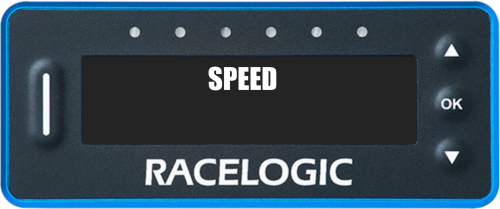
Because this is a very simple display mode, there are only 3 configurable settings for it in the Speed Menu.
You can configure:
- The number of decimal places in your speed
- The speed unit used
- The speed smoothing applied