Sign In |

LED Behaviour

Updated on May 13, 2026

When The LEDs on the front of the VBOX LapTimer will indicate the Delta-V of your vehicle. 

Red LEDs indicate that the speed is slower than the reference point and green LEDs indicate that the speed is faster than the reference point. When the LEDs are off, they indicate that you are matching the reference lap speed. 

Each LED on the unit represents 33% of the selected Delta-V range. 0 delta time is in the centre of the unit's LED array. 

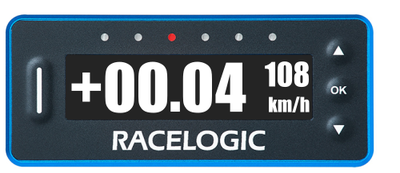
When the LapTimer calculates that your current speed is slower than the reference lap, the 3 LEDs on the left will gradually light up red from the centre and out, 1 LED per 33% of the Delta-V Range set in the Predictive Lap Timing settings. 
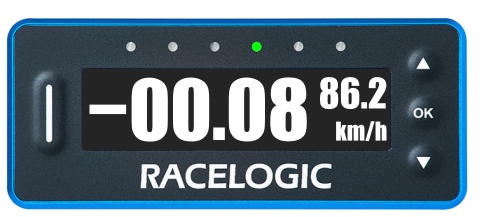
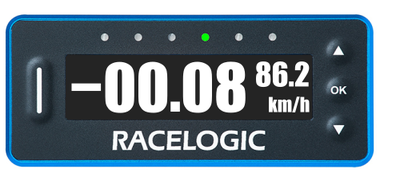
When the LapTimer calculates that your current speed is faster than the reference lap, the 3 LEDs on the right will gradually light up green from the centre and out, 1 LED per 33% of the Delta-V Range set in the Predictive Lap Timing settings. 
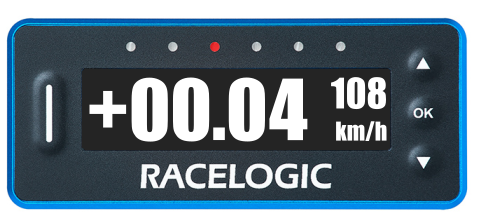
VBOX LapTimer showing the default Predictive Lap Timing Display with Delta-V active the 4th LED illuminated green to indicate that the current lap is slightly faster than the reference lap.
Faster Than the Reference Lap
VBOX LapTimer showing the default Predictive Lap Timing Display with Delta-V active and the 3rd LED illuminated red to indicate that the current lap is slightly slower than the reference lap.
Slower Than the Reference Lap
VBOX LapTimer showing the default Predictive Lap Timing Display with Delta-V active the 4th LED illuminated green to indicate that the current lap is slightly faster than the reference lap.
Faster Than the Reference Lap
VBOX LapTimer showing the default Predictive Lap Timing Display with Delta-V active and the 3rd LED illuminated red to indicate that the current lap is slightly slower than the reference lap.
Slower Than the Reference Lap

While the screen still displays the Delta-T for each lap, you have an optional mode that takes over the function of the LEDs when you are using predictive lap timing.

If the Combo G is greater than a selected minimum threshold (50 % LED minimum %, 0.5 g default), the LEDs will light up various colours dependent on the maximum g threshold selected (1.0 g default).

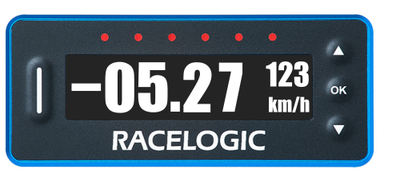
  • The LEDs will show red where the Combo G has reached the LED minimum % selected (50% by default).
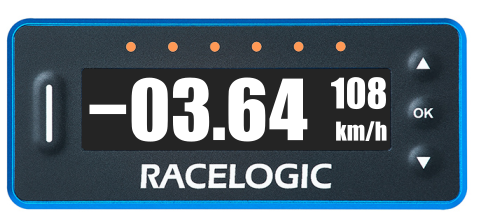
  • Above this minimum value, the LEDs will show a colour gradient between red and green, giving a changing yellow/orange colour, dependent on the live Combo G value.
  • The LEDs will show green where the Combo G is equal to or greater than the selected maximum g threshold.

You can change the settings for the Combo-G LED behaviour in the Predictive Lap Timing Menu.
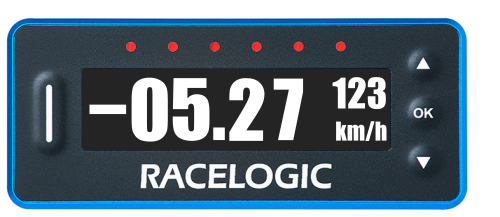
VBOX LapTimer showing the default Predictive Lap Timing Display with Combo-G active and the LEDs illuminated red to indicate that the Combo G has reached the set minimum %.
Minimum Combo G Threshold Reached
VBOX LapTimer showing the default Predictive Lap Timing Display with Combo-G active and the LEDs illuminated orange to indicate that the Combo G is above the set minimum %.
Combo G is Between the Minimum and Maximum Thresholds
VBOX LapTimer showing the default Predictive Lap Timing Display with Combo-G active and the LEDs illuminated red to indicate that the Combo G has reached the set minimum %.
Minimum Combo G Threshold Reached
VBOX LapTimer showing the default Predictive Lap Timing Display with Combo-G active and the LEDs illuminated orange to indicate that the Combo G is above the set minimum %.
Combo G is Between the Minimum and Maximum Thresholds