
IMPORTANT
The functionality described on this page applies to the default Performance App.
Behaviour may differ if a different app is installed.
Select Decel as the Display Mode and tap Settings → Decel.
Performance Box Touch will open the Decel Settings screen.
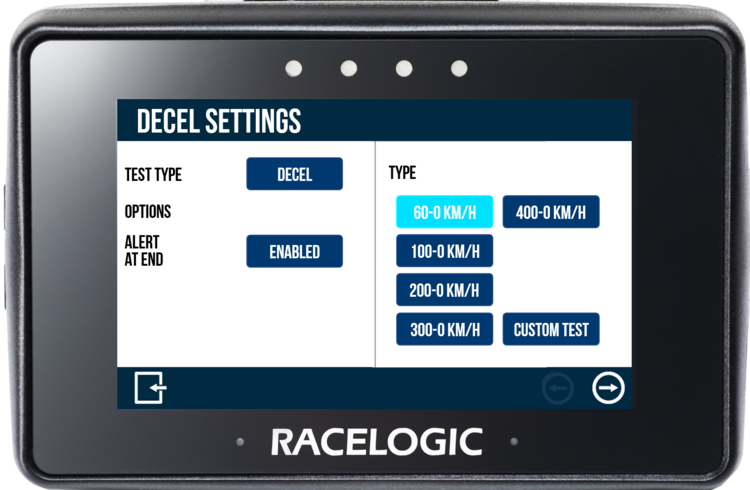
The Decel Settings is where you select the test parameters and manage other test options. You can change settings by tapping on the corresponding button next to an option.
Return to the Decel Mode screen by tapping on the Exit button in the footer.
There are preset and custom test options on the right-hand side of the settings screen. The currently selected Decel test is highlighted on the screen and will be remembered for future use, even when you use other display modes.
VBOX Touch is supplied with 5 preset speed decel tests. Tap a test to select it. The 60 – 0 KM/H test is selected by default.
- 60 – 0 (km/h or mph)
- 100 – 0 (km/h or mph)
- 200 – 0 (km/h or mph)
- 300 – 0 (km/h or mph)
- 400 – 0 (km/h or mph)
When a test is selected, the name will be displayed in the top right corner of the Decel Mode screen.
You can create a custom test where you choose your own start and end conditions by tapping the Custom Test button.
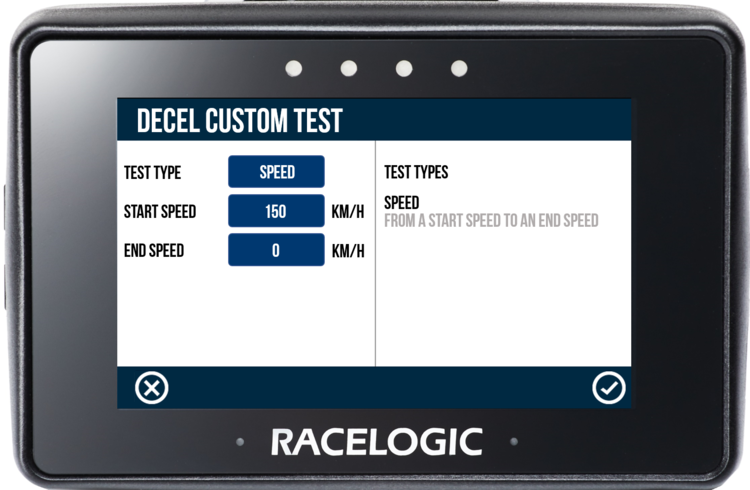
Define the start and end speed conditions by tapping the corresponding buttons and using the presented keypad to enter the speed values.
Save the new speed value by tapping the Confirm button in the bottom right corner of the screen, or return to the Decel Settings screen without saving by tapping the Cancel button in the bottom left corner of the screen.
NOTES
- The maximum input value for speed is 999.9 and can be entered up to 1 decimal place.
- The minimum start speed is 5 km/h/ 3.1 mph.
Save the custom test by tapping the Confirm button in the bottom right corner of the screen. Return to the Decel Mode screen without saving it, by tapping the Cancel button in the bottom left corner of the screen.
When selected, the name of the new custom test is displayed in the top right corner of the Decel Mode screen. The last defined Custom Test will be remembered for future use, even when you select a preset test or another display mode.
By default, an audible and visual alert signals when the test end criteria are met. The Performance Box Touch will beep, and the 4 LEDs across the top of the device will flash green for 0.5 s. Tap the button to disable.

By default, an audible and visual alert signals when the test end criteria are met. The Performance Box Touch will beep, and the 4 LEDs across the top of the device will flash green for 0.5 s. Tap the button to disable.
