
- Connect the 'CAN1 High' and 'CAN1 Low' ports of the expansion connector to the appropriate wires/cable.
- Connect the LabSat 3 Wideband antenna (RLACS249) to the 'RF IN' port.
- Fit the expansion connector to the LabSat.
- Power up the LabSat 3 Wideband and navigate to the ‘Digital’ section of the menu. Select the 'CAN' option.
- Pressing the ‘REC’ button on the front of the LabSat will begin the recording. The LabSat will record all CAN data available on the connected bus.
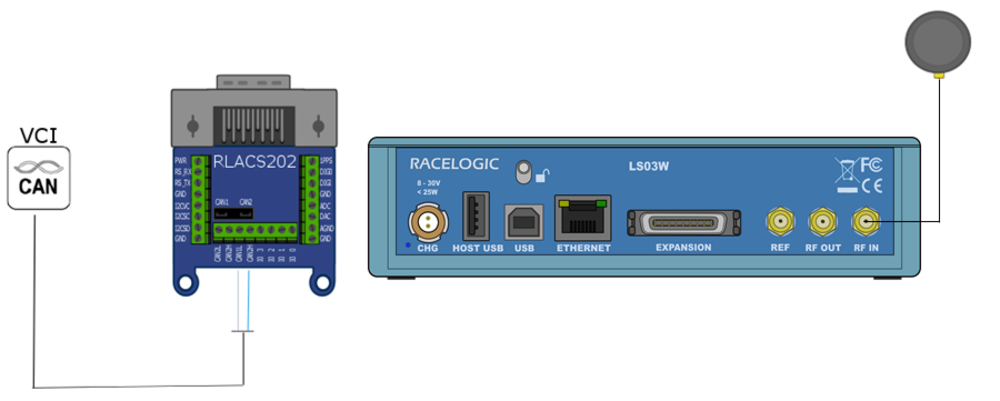
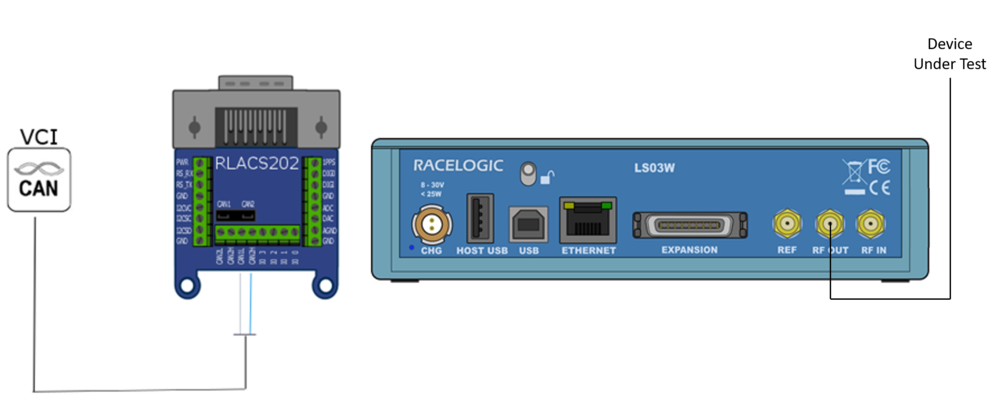
- Connect the 'CAN1 High' and 'CAN1 Low' ports of the expansion connector to the appropriate wires/cable.
- Connect the device under test to the LabSat 3 Wideband 'RF OUT' port.
- Fit the expansion connector to the LabSat.
- Power up the LabSat 3 Wideband and select the previously recorded CAN scenario.
- Pressing the 'Play' button on the front of the LabSat will begin the replay. The LabSat will replay all CAN data originally recorded.
NOTE
If you need further information about using LabSat 3 Wideband to record and replay Digitised CAN data, contact Racelogic Support.