
LabSat uses a binary Intermediate Frequency to down convert GPS RF data into a binary file, whereas LabSat 2, 3 and Wideband store GNSS RF data as an I & Q binary file. This means that existing LabSat scenarios cannot be run natively on a LabSat 2 or vice versa.
The LabSat scenario converter software, included on the LabSat 3 HDD, will convert LabSat, LabSat 2 and LabSat 3 files to each other’s format, as well as files in these formats to LabSat 3 Wideband format. This conversion utility will allow LabSat users to perform a one-time conversion of files
The operation of the conversion utility is detailed below:
IMPORTANT
You can only convert GNSS data files.
Files that contain external data, such as CAN bus or serial, cannot be converted.
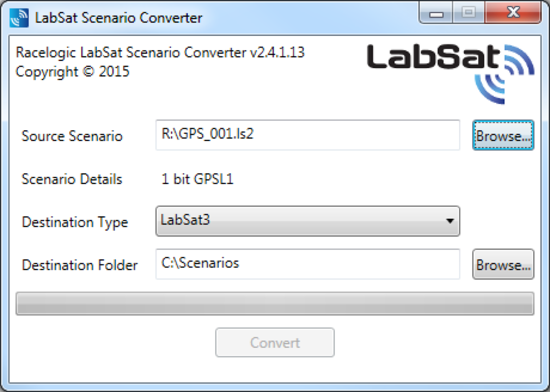
Load the file to be converted into the Source Scenario section using the Browse button, or manually enter the file location. When the file is loaded, the scenario information is displayed in the Scenario Details section.
The software automatically detects the source scenario file extension, so the Destination Type list only displays the other supported LabSat variants. Select the required LabSat variant to convert the file to.
Choose a location for the converted scenario using the Browse button, or manually enter the destination path in the Destination Scenario field.
NOTE
LabSat 3 file formats require a folder containing multiple data files. When converting to LabSat (.bin), LabSat 2 (.ls2), or LabSat 3 Wideband (.LS3W) formats, select the first file in the LabSat 3 scenario folder. The software automatically converts all files within the folder.
NOTE
When moving LabSat 3 scenarios between storage media, move the entire scenario folder rather than individual .ls3 files. Do not store additional files within the scenario folder.
IMPORTANT
Conversion of LabSat 3 Wideband files to other formats is not supported.