LabSat 3 units use HDD drives or SD cards to record and replay GNSS data.
If a Buffer Overflow message is displayed while recording large amounts of data, the SD card is unable to sustain the required data transfer rate. To resolve this issue, use an SD card designed for higher transfer speeds or use a high-speed HDD drive instead.
SD cards used with Racelogic products must be formatted as FAT32. LabSat 3 can format SD cards and HDD drives to FAT32 using an optimised configuration for high-speed recording.
When formatting storage media, LabSat 3 also performs a performance test to determine whether the media can sustain the required bandwidth. If the media is unsuitable, a warning message is displayed.
Compatible HDD drives and SD cards can be purchased directly from Racelogic.
TIP
Use an HDD drive, such as the LS03HDD-1TB, for recording and replaying GNSS data. This provides the most stable and reliable data transfer performance.
NOTE
When using an SD card with a LabSat 3 Triple Constellation variant, specific high-performance SD cards are required due to the high transfer rates used by the device. Recommended cards include the SanDisk Extreme Pro 32 GB (RLACS352).
For recording systems, LabSat is supplied with a magnetic-mount GNSS antenna. The antenna is an active device with approximately 28 dB of gain.
The LabSat unit provides a 2.85 V DC antenna bias on the centre pin of the RF IN connector.
Third-party antennas may also be used, provided they are compatible with the 2.85 V bias voltage supplied by the LabSat unit.
IMPORTANT
If connecting an antenna that requires a higher bias voltage (for example, 12 V), the antenna bias must be supplied externally by the user. An appropriate DC block, such as the DCB available from GPS Networking, must also be fitted to the LabSat 3 RF IN connector to prevent damage to the LabSat unit.
There are several GNSS systems currently in operation or in a test phase. These operate on the following 3 main frequency bands:
| Frequency Band | Constellations |
|---|---|
| 1575.42 MHz | GPS L1, Galileo E1, QZSS, SBAS |
| 1602 MHz | GLONASS L1 |
| 1561.098 | BeiDou B1 |
Depending on the model, LabSat 3 will have 1, 2 or 3 RF channels to allow recording of 1, 2 or 3 frequency bands.
For example, a 2-constellation LabSat 3 may record the band containing GPS L1/Galileo E1 and the band containing GLONASS L1 simultaneously.
You can configure the recording of the desired constellations in the CONSTELLATION menu. You can select up to three of the desired constellation groups (depending on the version you have). If you only select one constellation, an additional option for 2-bit will be available to allow 2-bit quantised recording for the selected constellation.
When you have configured the constellations, you can exit the menu and press the REC button to begin recording. The unit will create a new file each time it starts recording. The file name will correspond to the selected constellations.
For example, if you have selected GPS and GLONASS for recording, the file will be named GPSGLO_nnn where nnn is a number that increments with each new recording. You can get further details of the LS3 file format on request from Racelogic.
If you press the OK button while the unit is recording, it will switch the display to show satellite levels for either GPS or GLONASS satellites. In this display mode, you can use the UP/DOWN buttons to toggle between GPS or GLONASS constellations. The BeiDou constellation is not currently supported by the internal monitor, but you can still record and replay BeiDou B1 signals.
To maximise battery life during recording, LabSat 3 has a power-save mode enabled by default. You can change this setting in the setup menu. The power-save mode recognises when the unit is running from battery power and will dim the display backlight and power down the internal GPS/GLONASS monitor after 30 seconds of user inactivity.
If you are recording from passive antennas, such as the Maxtenna M1516HCT-SMA GPS/GLONASS antenna, having the power-save mode enabled will also provide the highest possible sensitivity by ensuring that unused modules in LabSat 3 are switched off.
LabSat 3 uses SD card or HDD memory for storage and playback of GNSS data. You must use SD cards of Class 10 or higher to sustain the required transfer speeds. We recommend SanDisk Extreme Class 10 cards for the best performance.
The 1 TB USB HDD supplied contains a selection of pre-recorded scenarios from around the world. These scenarios can easily be copied to the SD card for replay. The HDD supports either USB 2.0 or USB 3.0. For optimum data transfer performance from an HDD to an SD card, we recommend that you use a PC that supports USB 3.0.
The RF OUT connector is a 50 Ω output which can be connected directly to the antenna input of the GNSS receiver being tested. The RF OUT connector of LabSat 3 is DC blocked internally so almost any device can be connected to this port. When a file is selected for replay, the LabSat will configure constellation frequencies and digital channels automatically before starting replay. If a triple constellation file is selected for replay on a single channel LabSat, all three constellations will be displayed before replay allowing the user to select one.
During replay, pressing OK will show a live histogram of satellite levels detected by the internal GNSS receiver. The internal receiver currently only supports GPS and GLONASS constellations. This does not affect the LabSat 3 unit's ability to record or replay BeiDou signals. When displayed, the UP/DOWN buttons switch between GPS and GLONASS monitor modes. Please note that when switching between GPS and GLONASS display modes, the internal receiver will take some time to re-acquire satellite signal levels. In the case of GLONASS signals, it may take over a minute to show the satellite signal information.
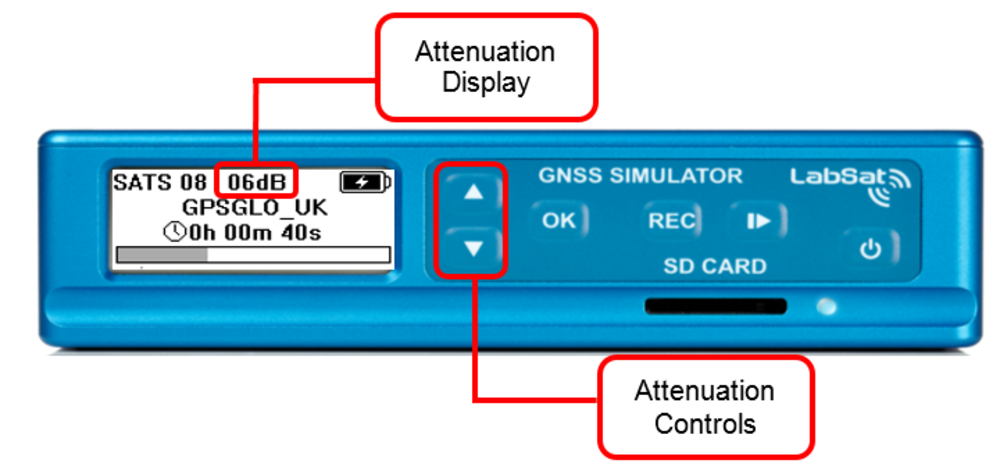
LabSat 3 comes with an internal 31 dB attenuation capability. To increase the attenuation press the up arrow, this will increase the attenuation by 1 dB. The down arrow will decrease the attenuation level.